
Read PDF aloud
Read your PDFs aloud, the way a human would
To listen to a PDF on iPhone offline, open it in Sandbook: it reads any text-based PDF aloud in a natural voice with no internet connection, repairing hyphenated and two-column line breaks before it speaks. That repair is the thing that ruins most PDF read-aloud, and fixing it is why a research paper reads as prose here instead of as a list of lines. The document is never sent anywhere, the voice is one of 41 generated on the device, and there is no account and nothing to buy.
iOS 18.2 or later · iPhone 12 or later · iPad with A14 or M1 · Mac with M1 or later, macOS 15.2 · No account
In short
How can I listen to a PDF on my iPhone offline?
Sandbook is a PDF reader that reads aloud on iPhone and iPad with no internet connection, repairing hyphenated and two-column line breaks before it speaks, so a research paper is read as prose rather than line by line. It is free, with no account and no character limit, and needs iOS 18.2 on an iPhone 12 or later. Printed pages and photos can be scanned with on-device text recognition, but an image-only PDF file is not recognized. On iPhone and iPad a PDF can be listened to but not exported as an audio file; the Mac app exports one page at a time as M4A.
Last verified September 28, 2026
Why most PDF read-aloud sounds broken
A PDF doesn't store paragraphs. It stores glyphs at coordinates, and the line breaks you see are a consequence of the page width, not of the sentence. When a naive reader pulls text out of a PDF it gets one line at a time, and it speaks them one line at a time — which is why so many apps read a research paper with a small hesitation every nine words, and pronounce a word split across a line break as two separate words.
Sandbook repairs this before a word is spoken. Visual line breaks are rejoined into continuous prose, and words hyphenated across a line end are stitched back together. “Represen-” plus “tation” becomes representation, not “represen” then “tation”. The result is a PDF that reads like a page of a book instead of a list of lines.
It is the specific reason PDF to speech works better here than in readers that treat a PDF like a text file — an EPUB already tells you where its paragraphs end, and a PDF never does.
One expectation to set before you install: Sandbook is a reader, not an audiobook exporter. It reads a PDF aloud while you have it open; it does not convert a document into an audio file you can keep. M4A export exists, but not for the whole document: on a Mac one page at a time, on iPhone and iPad only in Write text for text you typed or pasted there. If what you want is a whole book turned into a file, this app does not do it.
PDF to speech, step by step
- Open the file in Sandbook. Use the Files picker inside the app, or choose Open with Sandbook on a PDF in Files, Mail or Safari. The document is copied into the app's storage, so it stays readable after the original moves.
- Find it on the shelf. PDFs show a thumbnail of their first page, the title and a progress bar with the time left.
- Press play. Text is extracted a page at a time, so a 600-page textbook doesn't try to load itself into memory at once. Speech starts after the first sentence and keeps generating ahead of you.
- Move around. Tap any sentence to start reading from there, skip forward or back, or open the page list and jump to page 214.
Not on your iPhone right now? Try it in your browser: read a PDF aloud online, free. The file is opened on your own device and is never uploaded.
The page still looks like a page
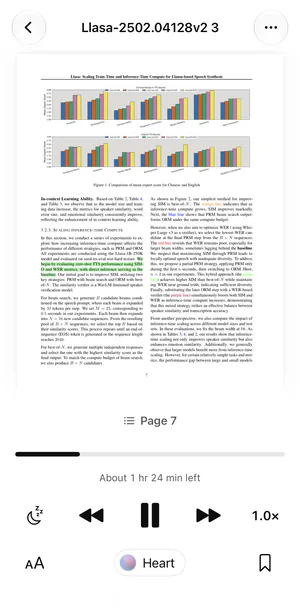
A PDF's layout is often the point — figures, equations, tables, a diagram you need to look at while the caption is read. So Sandbook shows the real page through PDFKit, with pinch-zoom and a swipe to turn one page at a time, rather than flattening your document into a wall of extracted text.
While it reads, the sentence being read is highlighted on the page itself, and tapping any sentence starts reading from there (word-by-word marking is for the text reader, not this page view), so you can track the argument visually while listening. When a page ends, the reader carries on to the next one by itself, and your place in the document is saved per file, so you can put a 40-page report down and come back to page 23 tomorrow.
Scanned PDFs, and scanning paper instead
If your PDF is a photograph of paper, a scanned book or a fax, there is no text layer in the file, and Sandbook does not run text recognition on PDF files. It will open the document and find nothing to say.
Paper itself is a different story. Sandbook can scan printed pages with the camera, up to 200 pages per scan, or read a photo or screenshot you pick. The text is recognized on your iPhone and each page becomes a chapter you can listen to. So for a handout or a book chapter on paper, scan the paper; for an image-only PDF, export its pages as images and use From Photo.
Apps that run text recognition on PDF files directly, such as Speechify and NaturalReader, are the better tool if most of your documents are image-only PDFs.
Speed and voice for dense documents
Reading a paper aloud is a different job from reading a novel. Speed runs 0.5× to 2.5× in steps of 0.1×, applied by scaling predicted phoneme durations inside the model rather than by resampling the audio, so pitch is preserved — 2× is a person reading quickly, not a chipmunk, and 0.7× on a difficult passage stays natural instead of sounding drugged.
For technical PDFs, the steadier voices tend to work best. Every one of the 41 voices can be auditioned live in the app with the real model before you commit forty minutes to it, and kept in Favorites with a heart for next time. Before installing, you can try a paragraph from your paper in the browser.
Questions about PDFs
Can it read a scanned PDF or a photo of a page?
A photo or a printed page, yes: Scan Pages uses the camera, and From Photo reads a picture or screenshot, with the text recognized on your iPhone. An image-only PDF file, no: Sandbook does not run text recognition on PDF files yet, so a PDF with no text layer reads as empty. Open the scanned pages as photos instead, or scan the paper again with the camera.
Does it read footnotes, headers and page numbers?
Page numbers, the running headers and footers in the page margins, and the small raised numbers that point to a footnote are left out when Sandbook can tell them from the text. Footnote text itself is read where it sits in the page's text, so on a heavily annotated academic PDF you will still hear some of it. Tapping the sentence you want to hear next is the fastest way past it.
Is my PDF uploaded anywhere?
No. The document is copied into Sandbook's own sandbox on your device and the speech is generated locally on the iPhone's GPU. Work documents and unpublished drafts never leave the phone, and reading them works in airplane mode.
Can I save a PDF as an audio file?
Not the whole document. On a Mac you can export the open PDF page as an M4A file; on iPhone and iPad, M4A export works only in Write text, for text you typed or pasted there. There is no whole-document export, so a complete PDF or EPUB cannot be saved as an audio file.
Is there a free PDF reader that reads aloud on iPhone?
Yes. Open a text-based PDF in Sandbook from Files or the share sheet and it reads it aloud in one of 41 natural voices, offline, with broken line endings and hyphenated words repaired first. There is no subscription, no in-app purchase and no character limit, and the document stays on your device. Image-only PDF files are not recognized; scan the printed pages with the camera instead.
Start with your next PDF
PDF to speech is the job most reading apps handle worst, and the fix is unglamorous: rejoin the lines, stitch the hyphens, keep the page visible, then read. Sandbook does that on your device, for free, in 41 natural voices, with nothing uploaded.
iOS 18.2 or later · iPhone 12 or later · iPad with A14 or M1 · Mac with M1 or later, macOS 15.2