
Kokoro TTS · On-device
Kokoro TTS, running entirely on your iPhone
Sandbook is a Kokoro TTS app that runs on iPhone, iPad and Mac. The whole Kokoro-82M model — all 82 million parameters — is bundled in the download, which is about 281 MB on iPhone with the model and all 41 voices included, and runs on your device through Apple MLX. There is no server call, no API key and no account. 41 voices in English, Spanish, French, Italian, Brazilian Portuguese and Hindi, 24 kHz output, free on the App Store.
iOS 18.2 or later · iPhone 12 or later · iPad with A14 or M1 · Mac with M1 or later, macOS 15.2 · No account
In short
Is there a Kokoro TTS app for iPhone?
Yes. Sandbook runs Kokoro-82M on iPhone and iPad (and natively on Macs with Apple silicon), with all 82 million parameters bundled in the download (about 281 MB, with the model and all 41 voices included) and executed on the GPU through Apple MLX. It is free, with no in-app purchase, no account and no character limit, with 41 voices in six languages, and needs iOS 18.2 on an iPhone 12 or later. The limits: on iPhone and iPad real-time reading pauses when the screen locks, and voices cover six languages, not dozens.
Last verified October 1, 2026
What a Kokoro TTS app looks like when the model is local
Most ways to hear Kokoro involve a machine that isn't yours: a Python script on a laptop, a Space on someone's GPU, a hosted endpoint behind a key. Sandbook is the other arrangement. The model file sits in the app bundle, the inference runs on the phone's own GPU, and the audio never exists anywhere else.
That changes what the app can promise. Nothing is queued, metered or rate-limited, because there is nothing on the other end to meter. There is no character cap, because no one is paying per character. You can open a 400-page book in airplane mode and it behaves exactly as it does on Wi-Fi.
It also changes what the app can't do. Everything below is the honest shape of that trade.
On a computer, you can try Kokoro in your browser before installing: the same model and all 41 voices run in the tab, free, and nothing you type is uploaded.
Kokoro TTS on iOS, offline
Sandbook is a text to speech app that brings Kokoro TTS to iOS with no server in the loop. The model and all 41 voices arrive with the install, so once it is on your iPhone or iPad there is nothing left to fetch. Turn on airplane mode and books, PDFs, scanned pages and pasted text still play, because the phone's own GPU does the work through Apple MLX. Everything stays on your device: no account, no API key, no upload.
It needs iOS 18.2 or later on an iPhone 12 or later, or an iPad with an A14 or M1 chip or later, or macOS 15.2 or later on a Mac with Apple silicon; it does not run on iOS 17. On iPhone and iPad, live reading pauses when the screen locks, but a chapter you prepare ahead of time keeps playing with the screen locked. Is there a Kokoro TTS app for Mac? Yes: Sandbook for Mac runs the same model and voices natively on Apple silicon, offline.
Kokoro-82M on Apple MLX
The engine is Kokoro-82M, the open-weight TTS model, ported to run on Apple MLX — Apple's array framework, which executes on the device GPU via Metal. MLX is why an 82-million-parameter model with an ALBERT-style text encoder, an LSTM duration predictor, a prosody predictor and an iSTFTNet vocoder is practical on a phone rather than merely possible.
Text is phonemized, chunked on sentence boundaries, and synthesized sentence by sentence with a two-sentence look-ahead. Playback starts as soon as the first sentence is ready while the next ones generate behind it, so a chapter begins in about the time it takes to read the chapter title — you are never waiting for a whole document to render before anything plays.
Speed is 0.5× to 2.5×, and it is applied inside the model by scaling predicted phoneme durations, not by resampling the finished waveform. 2× stays a person talking quickly rather than a chipmunk.
How fast is Kokoro on an iPhone?
These timings come from one reading session on an iPhone 15, taken from the app's own log; they are not a benchmark suite. Speech started about 2.5 seconds after pressing play on a fresh chapter: the first paragraph, 13.8 seconds of audio, was generated in 2.4 seconds. After that, paragraphs generated 3–6× faster than real time — 2.9 seconds of audio in 0.9 seconds, 13.6 seconds in 2.4 and 2.2 seconds in 0.6. The model stayed resident at about 220 MB of memory while reading, and a short warm-up at launch, about a second of synthesis, is there so the first sentence comes out quickly.
Older supported iPhones, back to the iPhone 12, are slower. On every one of them, playback starts after the first sentence while the rest renders behind it.
| Stage | Measured on iPhone 15 |
|---|---|
| Phonemizing | about 0.01 s |
| Text encoder | 0.05–0.09 s |
| Duration predictor | 0.2–0.5 s |
| Prosody predictor | 0.2–0.5 s |
| Decoder (vocoder) | 0.3–1.3 s |
What ships in the 281 MB download
The weights are loaded from the bundle, not fetched. Sandbook is a large download on purpose — about 281 MB, with the model and all 41 voices included — and this is what it buys you:
- kokoro-v1_0 weights — 82 million parameters, read straight out of the app bundle when the app starts.
- 41 voice embeddings, one style tensor per voice, all bundled, none locked or purchased.
- An eSpeak NG build for phonemization, compiled into the app as a framework.
Nothing here is downloaded after install, and nothing is streamed at runtime. The model loads when the app starts and is warmed up with a short synthesis, about a second, so reading begins quickly when you press play.
Where Sandbook differs from upstream Kokoro
Upstream Kokoro ships voices in several languages. Sandbook includes six of them: en-us and en-gb (28 voices), plus Spanish, French, Italian, Brazilian Portuguese and Hindi, 41 Kokoro voices in all. eSpeak NG switches language with the voice you pick, and the English text clean-up (dates, prices, units, acronyms) runs only for English voices. Kokoro voices in Spanish, French, Italian, Portuguese and Hindi on an iPhone, offline, is the part no hosted demo gives you.
Two more limits worth knowing before you install. On iPhone and iPad, real-time reading pauses when the screen locks: the model holds real GPU memory, and iOS suspends that work in the background. You can prepare a chapter's audio ahead of time and then listen with the screen locked. And it needs iOS 18.2 on an iPhone 12 or later, or an iPad with an A14 or M1 chip or later, or a Mac with Apple silicon on macOS 15.2, because MLX needs that GPU family.
There is also no voice mixing, no custom style vectors and no pronunciation dictionary — one quality tier, the same 82M model at 24 kHz for every voice.
Getting text into it
Import EPUB, PDF, Word, TXT, RTF, Markdown or HTML through the Files picker, “Open with Sandbook”, or the share sheet from any app. Add a web page with Paste a link or from Safari, and the app keeps the article and drops the menus, ads and cookie banners. Scan printed pages with the camera, or pick a photo, and the text is recognized on the device. Or type, paste or read your clipboard.
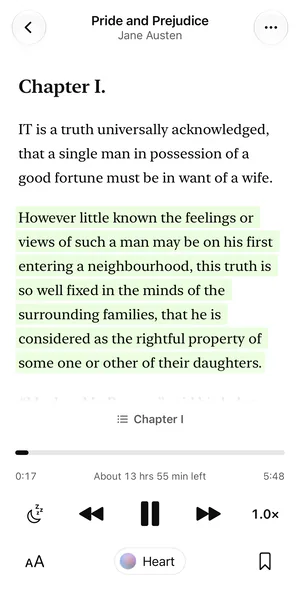
Books get word-by-word highlighting inside a softly tinted current paragraph, a chapter picker, tap-a-paragraph-to-read, and they open at the paragraph where you stopped. Each book remembers its own voice and speed. Text in Write text can also be exported as an M4A file through the share sheet; on a Mac, so can the open chapter or PDF page.
Kokoro TTS questions
Is this the same Kokoro as the open-source model?
Yes. Sandbook runs Kokoro-82M — the published open-weight model, same architecture, same 82 million parameters — converted to run under Apple MLX on the iPhone, iPad and Mac GPU. It is not a re-recorded imitation and not a different model wearing the name. The Kokoro credit and thanks are in the app's Settings screen.
Does it download the model on first launch?
No. The weights ship inside the app bundle, which is why the download is large. After installing, Sandbook never fetches the model, a voice, or a phoneme table. Reading, speech, scanning and export all work offline; only adding a web page needs a connection.
Can I use Kokoro's non-English voices?
Yes, for Spanish, French, Italian, Brazilian Portuguese and Hindi. Sandbook bundles 41 Kokoro voices: 28 in US and UK English plus 3 Spanish, 1 French, 2 Italian, 3 Brazilian Portuguese and 4 Hindi. The voice decides the language: a book in one of those languages opens with a matching voice, and each book remembers the voice you pick. Voices in other languages are not included.
How does on-device Kokoro compare to a server for speed?
Synthesis is sentence-by-sentence with a look-ahead buffer, so audio starts after the first sentence rather than after the whole document. In practice a paragraph starts speaking almost immediately and generation stays ahead of playback. A longer document doesn't make it start later, because there is no queue to wait in.
How long until it starts speaking?
Measured on an iPhone 15, about 2.5 seconds after you press play on a fresh chapter. Sandbook generates the first sentence, starts playing it and renders the rest behind it, so the wait does not grow with the length of the chapter. Older supported iPhones, back to the iPhone 12, take longer.
What hardware does it need?
iOS 18.2 or later on an iPhone 12 or later, or an iPad with an A14 or M1 chip or later; or macOS 15.2 or later on a Mac with Apple silicon (M1 or later). The model runs on the GPU through MLX, which needs the GPU family introduced with the A14 and M1, so older iPhones and Intel Macs cannot generate the voices. It does not run on iOS 17.
Is there a Kokoro TTS app for iOS?
Yes: Sandbook, free on the App Store for iPhone and iPad. It bundles Kokoro-82M and all 41 voices, runs them on the device GPU through Apple MLX and works offline from the first launch, airplane mode included. Everything stays on your device. It needs iOS 18.2 on an iPhone 12 or later and does not run on iOS 17. The same app runs natively on Macs with Apple silicon (macOS 15.2 or later), under the same free listing.
Is there a Kokoro TTS app for Mac?
Yes: Sandbook for Mac, free under the same App Store listing as the iPhone app. It bundles Kokoro-82M and all 41 voices, runs them on the Mac's GPU through Apple MLX, and works offline. It needs a Mac with Apple silicon (M1 or later) and macOS 15.2 or later; Intel Macs are not supported.
Kokoro TTS, on your own device
If you have been looking for somewhere to run Kokoro TTS that isn't a laptop, a Colab notebook or a hosted endpoint, this is a Kokoro TTS app that keeps the whole model — and everything you read with it — on your own device. 41 voices in six languages, on iPhone, iPad and Mac, free with nothing to buy inside.
iOS 18.2 or later · iPhone 12 or later · iPad with A14 or M1 · Mac with M1 or later, macOS 15.2